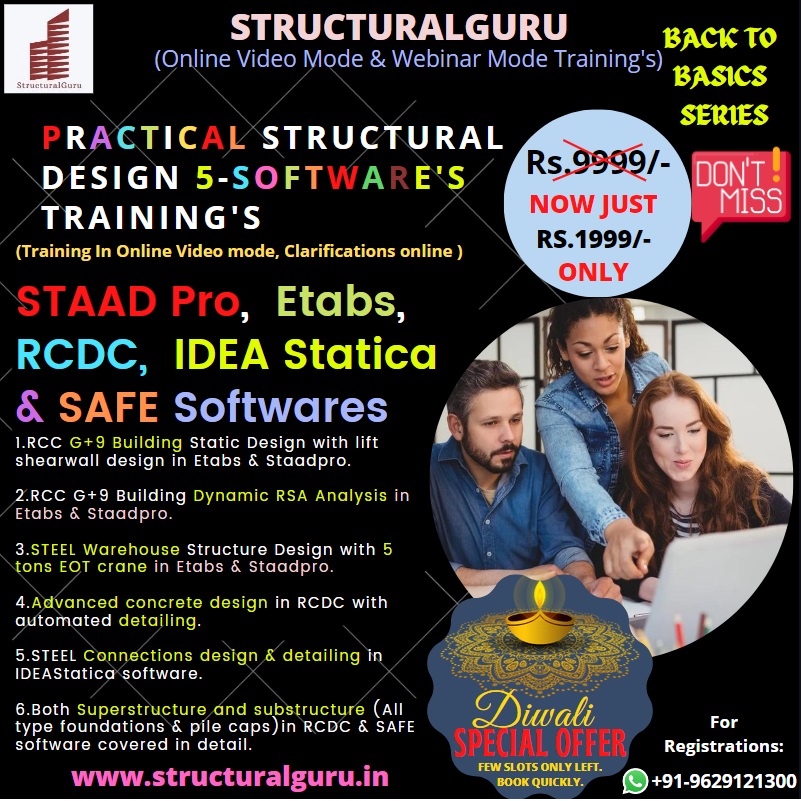
PRACTICAL STRUCTURAL DESIGN 5 SOFTWARES TRAINING - Staadpro,Etabs,SAFE,RCDC, Idea Statica-Video Mode 80 hrs Duration (80% DISCOUNT OFFER!!)
Welcome to StructuralGuru!
PRACTICAL ETABS,STAADPRO,RCDC,IDEA Statica & SAFE SOFTWARES Training in RCC G+9 BUILDING (STATIC & DYNAMIC) & STEEL WAREHOUSE STRUCTURE DESIGN in 80 Hrs Duration:


TO WHOM THIS TRAINING IS FOR?
CIVIL/STRUCTURAL
Ø Entrepreneurs
Ø Site Engineers
Ø Construction Engineers
Ø Project Engineers
Ø Planning Engineers
Ø Quantity Surveyors
Ø QA/QC Engineers
Ø Project Managers
Ø Draftsmen
Ø Design Engineers
Ø Engineering Students
Ø Architects
Ø Builders/Promoters
WHAT YOU WILL LEARN IN THIS TRAINING?
1.Detailed Syllabus of Etabs Software:
Introduction
Structure
Types of structures
Basic definitions
Idealization of structures
About ETABS
Features
hardware requirements
ETABS screen organization
GUI overview
Unit systems
Structure geometry
Coordinate systems (Global and Local)
The Structural Model
Units
Objects and Elements
Groups
Coordinate Systems and Grids
Properties Load Cases
Functions
Analysis Cases
Combinations
Design settings
Output and Display Definitions
The Graphical User Interface
The ETABS Screen
Main Window
Menu Bar
Toolbars
Display Windows
Status Line
Using the Mouse
Viewing Options
2-D and 3-D Views
Perspective
Pan, Zoom, and 3-D Rotate
Limits Element View Options
Other Options
Refreshing the Display Window
Basic Operations
File Operations
Defining Named Entities
Drawing Objects
Snap Tools
Drawing Controls
Selecting
Selecting Graphically
Selecting by Feature
Editing
Assigning
Undo arid Redo
Analyzing
Displaying
Graphical Displays
Model Definition
Analysis Results
Function Plots
Tabular Displays
Designing
Locking and Unlocking
Entering Numerical Data Setting Options
Define Grid System
Selecting template
Entering Grid System Data
Adding Grid Lines In X, Y and Z Directions
Define Material Properties
Specify Design Parameters
Material Property Data
Define Section Properties
Add Frame Section Property
Specify Frame Section Properties for Beam
Add New Frame Section Properties for Column
Specify Area Section Properties for Slab
Draw
Drawing beams with different methods
Drawing Colum as with different orientation
Drawing slabs Assigning Properties
Assigning Properties to Frame Elements
Assigning Properties to Area Elements
Assign Restraints
Assigning Fixed, Pinned, Roller Support at Joints
Define and Assign Load Cases
Adding and Assigning Dead Load Case
Adding and Assigning Live Load Case
Add rig and Assigning Wind Load Case
Adding and Assigning Seismic Load Case
Defining Load Combinations
Adding different Load Combinations for dead Load, Live Load, Wind Load and Seismic Load
View Analysis Results in Tabular Form
View Analysis Result Diagrams of Frame Elements
View Analysis Result Contour in Slab Panels
Concrete Design
Concrete Frame Design and View Design Results
Steel Design
Steel Frame Design and View Design Results
View Design Parameters
View Load Combination for Concrete Frame Design
View Reinforcement for Frame Design
View Percentage Steel for Frame Design
Steel Frame Design and View Design Results
View Load Combination for Steel Frame Design
Projects
Project in concrete Structure
Project in steel structure
Live Project Covered from scratch:-
· Reinforced Concrete Design
G+9 Building with Static & Response Spectrum Analysis and Design.
· Warehouse steel structure design with 5 tons EOT crane.
2.Detailed Syllabus of Staadpro Software:-
Basics Syllabus:-
· Overview of Structural Analysis and Design
· Introduction to STAAD Pro. V8i
· Getting Familiar with STAAD Pro. Workspace
· Staad Editor
· GUI
· Structure Wizard
· Creating a New Project and Units
· Global Coordinate System Vs. Local Coordinate
· Beta Angle
· Introduction to File, Edit, View, Selection, Geometry, Commands, Analyze, M ode
· Introduction to Snap Node/Beam
· Insert Node and Add Beam
· Translational Repeat
· Circular Repeat
· Move
· Rotate
· Mirror
· Member Offset
· Connect Beam Along
· Intersect, Merge, Break, Splits, Renumber and Stretch selected members
· Introduction to Setup, Geometry, General, Analysis/Print and Design
· Assigning Properties
· Assigning Supports
· Group Specification
· Assigning Load
· Structure Analysis
· Material Specification
· Loading
· Self weight
· Nodal Load
· Member Load
· Area Load
· Floor Load
· Wind Load
· Moving Load
· Reference Load
· Plate Load
· Seismic Load
· Automatic Load Combination
· Introduction to Analysis
· Perform Analysis
Advanced Syllabus:-
· Overview of Output Page
· Pre-analysis and Post-analysis Print
· Inactive/Delete Specification
· General Guideline for Design
· Column and Beam Design
Live Project Covered from scratch:-
· Reinforced Concrete Design
G+9 Building with Response Spectrum Analysis.
· Warehouse steel structure design with 5 tons EOT crane.
3.Detailed Syllabys of RCDC Software:
· Overview of RCDC software
· Exporting files from Etabs/Staadpro to RCDC
· Advanced concrete Slab Design
· Advanced concrete Beam Design
· Advanced concrete Column Design
· Advanced concrete shear wall, retaining wall Design
· Design corrections and modifications
· Report creation and printing.
· Advanced automated detailing drawing creation and saving.
· Detailed Design drawing editing to submission.
4.Detailed Syllabys of SAFE Software:
· Overview of SAFE software
· Exporting files from Etabs to SAFE
· Verifying design loads and parameters from Etabs
· Advanced concrete Combined Footing Design
· Advanced concrete MAT footing Slab Design
· Report creation and printing.
· Advanced automated detailing drawing creation and saving.
· Detailed Design drawing editing to submission.
5.Detailed Syllabus of Idea Statica Software:
1.Intro on Steel Connections & various types of connections.
2.How to get beam end forces from analysis file both staadpro & Etabs. 3.Beam to column flange Shear (pin) connection both bolted.
4.Beam to column flange shear connection welded.
5.Beam to column flange moment (fixed) connection bolted.
6.Beam to column flange moment connection welded.
7.same 3,4,5,6 connections in web of columns.
8. Truss start type connection.
9.Brace connection.
10.Base plate connection both Pin & Fixed.
Pdf codes, notes, manuals,ref.books,etc all included.
Features of this Training:
✓ Life time doubts and clarifications support through WA, or SKYPE, or ZOOM.
✓ 25 yrs experienced teaching in practical way.
✓ Code books verification for both RCC & STEEL design.
✓Get hands on Experience with industry experts.
✓ Live project design work-shop with exercises reviews encouraged.
✓ Live Project work reviews & guidance’s.
✓ Life time access for pdf files, software files, manuals, books, notes. Videos for 6 months view access validity.
✓ Life time after training technical guidance support.
✓ Remote software installation on call & on charge facility.
✓ Part time job with us in business development team for fresher’s.
Once payment is done, just click "REQUEST ACCESS" in the redirected google drive access file. Our admin will soon approve access, then you will be notified by email in your given gmail id. You will get folder named "PRACTICAL STRUCTURAL DESIGN SOFTWARES TRAINING" in your given Gmail id. You can see the same folder in shared with me tab in your google drive.
Please search in spam folder as well, as our mail sometimes reach there too.
Inside that folder class video files, notes, software files will be there.
Pls go through class videos in serial manner to complete entire training.
Any technical clarifications please message in whatsapp no.9629121300.
For Video & Google Review Testimonials visit: www.structuralguru.in
Thank & Regards,
GRA Training Department,
www.structuralguru.in
admin@gururayarassociates.com
WA: +91-9629121300
WA:+91-9489645708
StructuralGuru GururayarAssociates
Who are we?
 We "StructuralGuru" are Education & Training division of Gururayar Associates www.gururayarassociates.com Govt registered and ISO 9001-2015 certified single ownership company established in 2016  with 27 years of Industrial, commercial and residential design/consultancy experience in the field, we decided to alter direction. Now, we share our passion by helping others.


OUR MOTTO: HELP EACH OTHER ! GROW  TOGETHER !!


Want to create landing pages for your business? Visit Instamojo Smart Pages and get started!